Design systems / DS-01
Design system for web.
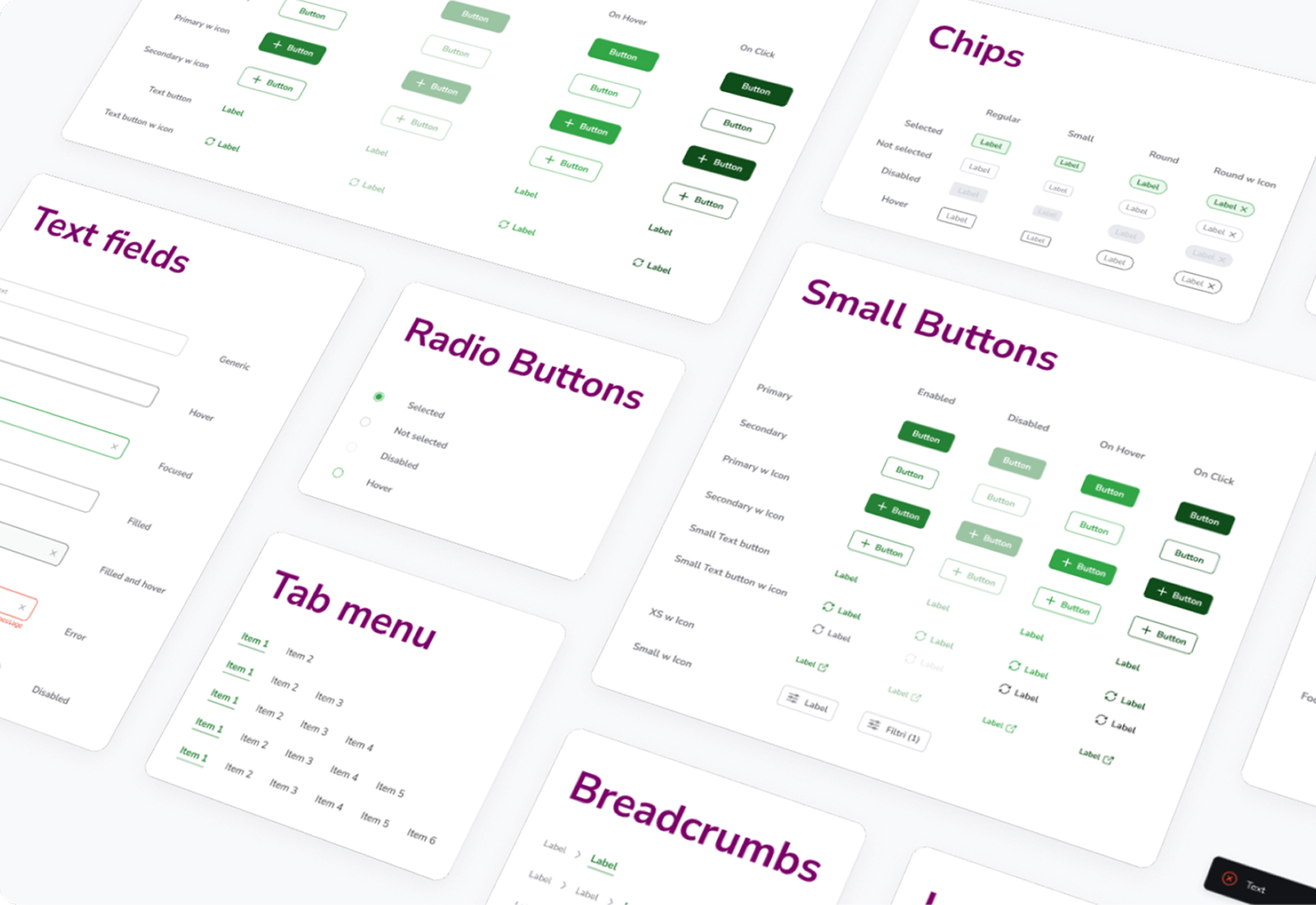
Eight web apps, built by different teams over a decade, each with its own idea of what a button is. I designed one system to replace all of them: a single source of truth for tokens, components and patterns.
01
Overview
- Client
- Private banking group · under NDA
- Role
- Sole designer: audit, foundations, components, documentation
- Scope
- 8+ web apps for advisors, back office and clients
- Team
- Me, two front-end developers, one product owner
- Year
- 2024
- Tools
- Figma (variables, component properties), Storybook
- Less handoff time
- 70%
- Web apps unified
- 8+
- Components
- 40+
- Design tokens
- 180
02
The problem
Eight apps, eight languages
The client's web ecosystem had grown one project at a time. Each app was built by a different vendor, in a different year, with its own UI kit. Advisors switched between three or four of them every day, and every switch meant relearning where things were and what they did.
On the design side, every new feature started from zero. Designers redrew the same table, the same date picker, the same modal, and developers rebuilt them. Handoff meant long annotation files and weeks of back-and-forth about spacing and states.
I started with an audit: a screenshot of every interactive element across all eight apps, grouped by type.
- Shades of green
- 14
- Button styles
- 23
- Date pickers
- 6
- Font families
- 4
03
Approach
Small enough to adopt
A system that waits to be complete never ships. I aimed for the smallest set that would let a team build a real screen, released it, and grew it from what teams actually asked for.
- Audit
Inventory every component and pattern in use, and count how often each appears.
- Foundations
Agree on colour, type, spacing and elevation first, as tokens shared by Figma and code.
- Core components
Build the 20% of components that cover 80% of screens: buttons, fields, tables, navigation.
- Documentation
One page per component: anatomy, states, usage rules and do's and don'ts.
- Pilot and rollout
Rebuild one app with the system, fix what breaks, then move app by app.
04
Foundations
Tokens first
Every visual decision lives in a token, in three layers. Primitives hold the raw values (green-600, space-4). Semantic tokens give them a job (action-primary, surface-raised). Component tokens point at those for one specific use (button-primary-bg-hover).
Apps only ever use semantic and component tokens. That means a rebrand, or a white-label version for a partner bank, is a change to a few primitives instead of a redesign.
- action-primary#1E8E3E
- action-primary-hover#34A853
- action-primary-pressed#0D5E2A
- text-brand#7B1173
- feedback-error#D93025
- surface-page#F6F7F8
05
Components
Every state, on paper
Most handoff questions are about states nobody drew. So every component is specified as a full matrix: enabled, hover, pressed, focused, disabled, plus error and filled where they apply, for each variant and size.
Accessibility is part of the spec. Every text and background pair passes WCAG AA, every interactive element has a visible focus ring, and touch targets never go below 32 px, even on small buttons.
06
Handoff
Same names on both sides
I worked with the front-end developers so that design and code describe things the same way:
- Figma variables map one-to-one to CSS custom properties, exported from the same source.
- Component and property names in Figma match the props in Storybook.
- Each component page links its Figma frame to its Storybook story.
Handoff turned from an annotated file into a list of component names. A developer reading Button / Secondary / Small / With icon knows exactly what to build, because it already exists.
07
Outcome
One ecosystem
The pilot app was rebuilt on the system in six weeks. Within a year, all eight apps were using it, and new features were designed directly with system components.
Handoff time dropped by 70%. More importantly, advisors moving between apps stopped noticing they were switching: a button, a table and an error message now look and behave the same everywhere.
“We stopped arguing about pixels and started talking about the product.”
What I learned
- Adoption is the product. The best component is useless if teams don't trust it. Shipping early and fixing fast earned that trust.
- Name things once. Shared naming between Figma and code saved more time than any single component.
- Say no, with a reason. Most requests for a new component were a variant of an existing one. Documenting why kept the system small.